Lua GossipMenuAddItem
Description
After creating a new gossip menu with GossipCreateMenu(), you can add items, or options, to the menu for players to use. These options appear in the gossip window, which opens when interacting with an NPC.
To display the menu to the player, use GossipSendMenu() at the end of the menu.
Syntax
pUnit:GossipMenuAddItem(int Icon, char Name, int Intid, int (bool) Code[, char Popup, uint32 Gold])
pUnit: Usually an NPC, GameObject, or Item. A Player is also accepted. It should be the same object used with GossipCreateMenu().
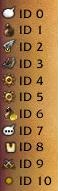
Icon: The icon displayed before the option name in the gossip window.
Name: The option name or label displayed in the gossip window.
Intid: A key value used by the gossip select hook to identify the selected option and link it to a script.
Code: Determines whether the player must enter a value in a code box before proceeding. If 0, no code box is shown. If 1, a code box is shown. The entered value is passed to the gossip select hook.
Popup: Determines whether a popup is shown to the player and what text it contains. Use an empty string (”“) to display no popup. Optional.
Gold: The amount of copper required to access the menu option. The player is notified if they do not have enough copper. The required amount is displayed when the option is selected. The copper is not removed automatically and must be removed in the gossip select hook. Optional.
Usage/Example
local function NPC_GossipHello(pUnit, event, pPlayer)
    pUnit:GossipCreateMenu(100, pPlayer, 0)
    pUnit:GossipMenuAddItem(0, "Example", 1, 0)
    pUnit:GossipMenuAddItem(9, "Sword icon and ask for code", 2, 1)
    pUnit:GossipMenuAddItem(3, "Gold requirement, no popup", 3, 0, "", 100)
    pUnit:GossipMenuAddItem(4, "Ask for code, 99 copper and send a popup saying \"hello\"", 4, 1, "Hello", 99)
    pUnit:GossipSendMenu(pPlayer)
end

RegisterUnitGossipEvent(123, 1, NPC_GossipHello)
Attaching scripts
After creating the menu and adding its options, you can use if statements to assign actions to each option using the Intid assigned to it.
Note: If a Player is the sender of the initial menu, the buttons do not work and you cannot run scripts from gossip selection. Gossip selection cannot be registered for a Player.
You can only send the menu to the Player from a Player.
Usage/Example
local function NPC_GossipHello(pUnit, event, pPlayer)
    pUnit:GossipCreateMenu(100, pPlayer, 0)
    pUnit:GossipMenuAddItem(0, "Example", 1, 0)
    pUnit:GossipMenuAddItem(9, "Sword icon and ask for code", 2, 1)
    pUnit:GossipMenuAddItem(3, "Gold requirement, no popup", 3, 0, "", 100)
    pUnit:GossipMenuAddItem(4, "Require 99 copper and send a popup saying \"hello\"", 4, 1, "Hello", 99)
    pUnit:GossipSendMenu(pPlayer)
end

local function NPC_GossipSelect(pUnit, event, pPlayer, id, intid, code)
    if (intid == 1) then
        -- "Example" option
        pUnit:SendChatMessage(14, 0, "Example message")
    elseif (intid == 2) then
        -- The NPC says what the player entered in the code box.
        pUnit:SendChatMessage(14, 0, code)
    else
        -- Any other option
        pUnit:SendChatMessage(14, 0, "You clicked an option with intid: "..intid)
    end

    pPlayer:GossipComplete()
end

RegisterUnitGossipEvent(123, 1, NPC_GossipHello)
RegisterUnitGossipEvent(123, 2, NPC_GossipSelect)
Icons
There are several icons that can be used with gossip menu items. The icon is specified by the number before the text used to label the item. The following are some examples; this list is not exhaustive:
0 = Chat bubble
1 = Bag
2 = Fly
3 = Book
4 = Cog/Gear
5 = Cog/Gear
6 = Bag with coin
7 = Chat bubble with "..."
8 = Tabard
9 = Two swords Crossing
10 = Yellow dot